
How to write hundreds of times faster programme using GPU?
In 2007, Nvidia released CUDA (Compute Unified Device Architecture) and made GPU accessible for general and bi-direction computing. It allowed developers to access hundreds of GPU core’s substantial computational power and write a high-speed general-purpose program for specific tasks.
CUDA is a computing platform and application programming interface (API) model, which allows developers to use Nvidia based GPU for programming. GPU for programming is also known as GP-GPU (general-purpose computing on graphics processing units) or Hybridizer or Parallel computing on GPU.
GPU core can improve a program written using the GPU core. You can improve performance hundreds of times when using GPU core over a program written for a CPU core. How can a GPU make a programme so much faster even when you have i7, a six-core CPU?
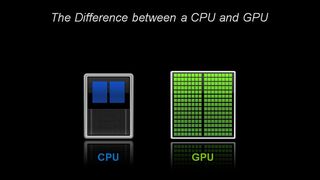
A CPU has few cores (6 cores in the case of an i7 processor). On the other hands, a GPU has hundreds of cores, as shown in the image above. A GPU is suitable to accelerate calculations involving massive amounts of data.
A GPU can never fully replace a CPU: a GPU complements CPU architecture by allowing repetitive calculations within an application to run in parallel. At the same time, the main program continues to run on the CPU.
Here are some fundamental difference between CPU and GPU core.
| CPU | GPU |
|---|---|
| Few cores. | Hundreds of cores. |
| Low latency. | High throughput. |
| Suitable for serial processing. | Suitable for parallel processing. |
| Can do a handful of operations at once. | Can do thousands of operations at once. |
| Suitable for handling complex tasks, control flows etc. | Good for handling billions of repetitive low-level tasks. |
Here is another excellent example of CPU and GPU visual comparison by Adam Savage & Jamie Hyneman.
Limitation of CUDA programming
- Only available for Nvidia based GPU.
- Not suitable for IO operations
- Cannot reference data in computer memory
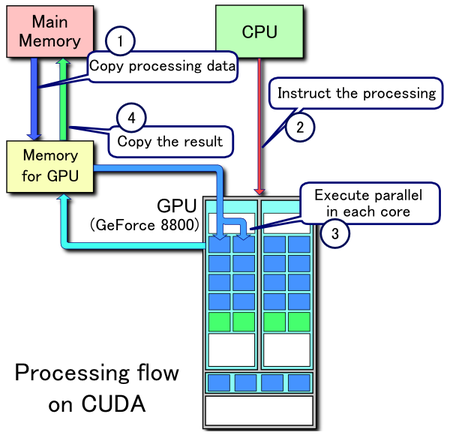
Here is the processing flow of GPU parallel programming.
What kind of task best suitable for GPU programming?
In the current time, when we see a massive rise in artificial intelligence and machine learning. Machine learning uses GPU for processing a vast amount of data. Algorithms well-suited for using GPU core that shows these characteristics Data parallel and throughput intensive. GPU can process different data element simultaneously.
GP-GPU parallael programming for .NET
At the moment, there is no native support of GPU programming for .NET. There are few third party options available to use GPU. Hybridizer from Altimesh is the best available commercial compiling solution for C#. Hybridizer generates code/binaries for multicore CPU and GPU. NVidia’s Nsight Visual Studio Edition is available to download from the Nvidia website for debugging and profiling code. Here is the link for setting up the visual studio for Hybridizer.
Hybridizer can be integrated with complex projects, even for libraries. Hybridizer operates on MSIL bytecode.
Here is a sample code that I tested on Intel(R) HD Graphics card. I have achieved an 80% performance boost. I am sure more can be achieved if the code is optimised.
using Hybridizer.Runtime.CUDAImports;
using System;
using System.Diagnostics;
using System.Threading;
using System.Threading.Tasks;

namespace Cuda_Test
{
    class CudaTest
    {
        // Make sure to set number of threads which your mahcine can support
        // I would recommond to go for 8-128 CPU or GPU core
        public static readonly int MAX_PARALLEL_CORE = 16;

        // Set Count as high as possible. Remember higher the number longer it will take to run
        public static readonly int TEST_COUNT_NUMBER = 68000000;
        private static double[] a = new double[TEST_COUNT_NUMBER], b = new double[TEST_COUNT_NUMBER], c = new double[TEST_COUNT_NUMBER];

        static void Main(string[] args)
        {
            Console.WriteLine("Setup data . . .");

            SetupData();

            Console.WriteLine("Ready! Press any key to launch the test.\nDo you want to run it on the GPU? (y/n)");
            if (Console.ReadKey().Equals('y'))
                RunOnGPU(a, b);
            else
                RunOnCPU(a, b);

            Console.ReadKey(); Console.ReadKey();
        }

        internal static void SetupData()
        {
            int MsgFreq = TEST_COUNT_NUMBER / 5;
            Random generator = new Random();
            Parallel.For(
                0,
                TEST_COUNT_NUMBER - 1,
                new ParallelOptions { MaxDegreeOfParallelism = MAX_PARALLEL_CORE },
                i =>
                {
                    a[i] = generator.Next(int.MaxValue);
                    Thread.Sleep((int)a[i] % 3);
                    b[i] = generator.Next(int.MaxValue);
                    if ((i + 1) % MsgFreq == 0)
                        Console.WriteLine("\tIteration " + (i + 1));
                });
        }

        [EntryPoint]
        internal static void RunOnGPU(double[] a, double[] b)
        {
            cudaDeviceProp prop;
            cuda.GetDeviceProperties(out prop, 0);
            //if .SetDistrib is not used, the default is .SetDistrib(prop.multiProcessorCount * 16, 128)
            HybRunner runner = HybRunner.Cuda();
            // create a wrapper object to call GPU methods instead of C#
            dynamic wrapped = runner.Wrap(new LoadTest());

            Console.Out.WriteLine("\n[" + DateTime.Now.ToLongTimeString() + "] Started heavy load task on GPU.");
            var executionWatch = Stopwatch.StartNew();

            wrapped.Run(a, b);

            executionWatch.Stop();
            Console.Out.WriteLine("[" + DateTime.Now.ToLongTimeString() + "] Finished heavy load task.");
            double elapsedS = Math.Floor((double)executionWatch.ElapsedMilliseconds / 1000), elapsedMs = executionWatch.ElapsedMilliseconds % 1000;
            Console.Out.WriteLine("The time elapsed during the load is " + elapsedS + " s " + elapsedMs + " ms.");
        }

        public static void Run(double[] a, double[] b)
        {
            Parallel.For(
                0,
                TEST_COUNT_NUMBER - 1,
                new ParallelOptions { MaxDegreeOfParallelism = MAX_PARALLEL_CORE },
                i => {
                    double auxA = a[i];
                    a[i] = Math.Atan(Math.Log10(a[i] / 13021) + Math.Log10(Math.Min(int.MaxValue, Math.Pow((b[i] / 231232423), 4))));
                    b[i] = Math.Atan2(Math.Log10(auxA), Math.Log10(b[i]));
                    c[i] = Math.Log10(Math.Sqrt(Math.Pow(a[i] - b[i], 2)));
                });
        }

        internal static void RunOnCPU(double[] a, double[] b)
        {
            Console.WriteLine("[" + DateTime.Now.ToLongTimeString() + "] Started heavy load task on CPU.");
            var executionWatch = Stopwatch.StartNew();

            Run(a, b);

            executionWatch.Stop();
            Console.WriteLine("[" + DateTime.Now.ToLongTimeString() + "] Finished heavy load task.");
            double elapsedS = Math.Floor((double)executionWatch.ElapsedMilliseconds / 1000), elapsedMs = executionWatch.ElapsedMilliseconds % 1000;
            Console.WriteLine("The time elapsed during the load is " + elapsedS + " s " + elapsedMs + " ms.");
        }
    }
}


Very good read. Thanks for sharing and explaining.
Thanks Jason
Code did not run.
Please make sure you have installed Hybridizer and visual studio is enabled for C++
Thanks Anil. It is working now.
How can I manipulate strings? I have a document that I want to process using GPU
Hi Rakesh,
I am afraid Hybridizer doesn’t support strings in C# at the moment. If you can provide more information, I may be able to help.
I get an error at the new LoadTest(). Could you please tell me how to fix it?
What error are you getting?